Understanding Service Jobs
Learn how service jobs help you track work from start to finish
Understanding Service Jobs
Service jobs are the core of Hydra's work tracking system. They represent individual pieces of work—whether it's a vehicle repair, a project, or any service you provide.
What is a Service Job?
A service job tracks:
- Customer information - Who the work is for
- Item details - What's being serviced (vehicle, equipment, etc.)
- Work description - What needs to be done
- Status - Current stage of the work
- Timeline - When it started, expected completion
- Notes - Progress updates and communications
Creating a Service Job
There are two ways to create service jobs:
From a Booking
When a customer's booking appointment arrives:
- Open the booking
- Click Create Service Job
- Details are automatically populated
- Add any additional information
- The job is created and ready for work
Manually
For walk-ins or phone orders:
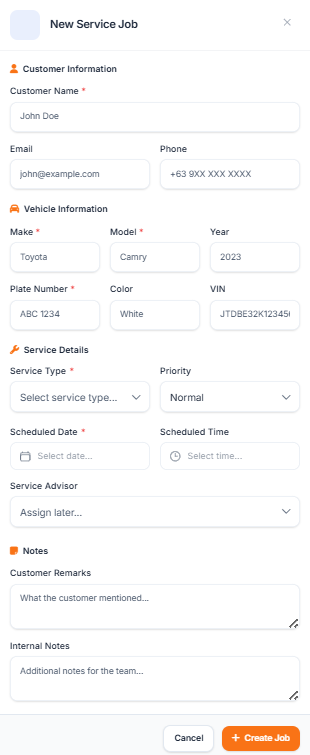
- Go to Service Jobs → Create New
- Enter customer details
- Add item information (e.g., vehicle make/model)
- Describe the required service
- Set the expected completion date
- Save the job
Service Job Statuses
Jobs progress through these stages:
| Status | Description |
|---|---|
| Pending | Job created, not yet started |
| In Progress | Work has begun |
| Waiting | Paused (waiting for parts, approval, etc.) |
| Quality Check | Work complete, being inspected |
| Ready | Finished and ready for pickup |
| Completed | Customer has picked up |
The Service Board
The Service Board provides a visual overview of all active jobs:
- Kanban-style columns for each status
- Drag and drop to update status
- Color coding by priority or age
- Quick filters for technician assignments
Access it via Service Jobs → Board in your sidebar.
QR Codes
Every service job gets a unique QR code that:
- Links directly to the job details
- Allows status updates via mobile
- Can be printed and attached to items
- Enables customer self-service tracking
Learn more about QR codes in the next tutorial.